abbreviation购物车
购物车 时间:2021-04-11 阅读:()
EM03JUN10JRSEM03_JUN_10JRSEMPOShoppingCart:CreateanEMPOOrderUsethisJobAidto:LearnhowtoplaceanemergencypurchaseorderinSAPafternormalPurchasingSharedServicesoperatinghoursBEFOREYOUBEGINYouwillneedtoknowwhatyouwouldliketoorder,thevendor,andtheGeneralLedger(G/L)accounttochargeto.
CreateanEMPOOrderAnEMPOorderisarequestformaterialsorservicesthataretimesensitiveormissioncriticaloutsideofPurchasingSharedServicesnormaloperatinghours.
Thisdocumenttypeisavailabletoselectusersonly.
ThisdocumenttypebecomesanEMPOpurchaseorder,onceapproved.
ThisPOtypealertsthePurchasingDepartmentthatthisorderisforanurgentlyneededandalreadyordereditem.
1.
CreateaCart.
AttheShoppingHomePage,click"CreateShoppingCart.
"Youmaywanttoclosethe"DetailedNavigation"panelontheleftsideofthescreentogiveyoumoreroom.
Dothatbyclickingonthesmallinthetoprightcornerofthepanel.
HelpfulHint2.
EnterGeneralData.
The"CreateShoppingCart"screenwillappear.
Startyourorderinthe"GeneralData"sectionofthisscreen.
Thefirststepistorenamethecart.
ForEMPOs,theShoppingCartNamefieldcompletedbytheSRMRequisitionermustcontaintheabbreviationEM,thePurchaseOrder(PO)date,andtheinitialsofthecreator.
Thisfieldcancontainnospacecharacters.
Example:EM03_JUN_10JRS(EM;thePOdateofJune3rd,2010;andtheinitialsofthecreator,JohnRobertSmith)Click"SetValues"nexttothelabel"DefaultSettings"tosetthedefaultvaluesthatwillbecarriedthroughoutthiscart.
Notethatevenafteryousetthedefaultvalues,youcanstillchangeindividualitemswithinthecarttodifferentvalues.
Thisfeaturecanbeagreattime‐saverforcartswithmultiplelines.
Selectthedocumenttypeforyourorder.
Inthiscase,we'llchangeittoEMPO.
Fuses20EA22.
00Whenthe"ChangeDefaultSettings"dialogboxappears,youwon'tseeallofthetabsthatareavailabletoyou.
Eitherstretchtheboxhorizontallysothatallofthetabsappear,orjustclickonthewhitefilefoldertodisplayalistoftheavailabletabs.
HelpfulHint3.
EnterItemData.
Gotothefirstlineintheorderandstartenteringtheorderinformation.
You'llworkyourwayacrossthelineforeachitembeforeyoupressEnter.
Startwiththe"Description"field.
Inthiscase,we'veentered"Fuse"asthedescription.
Nextenterthe"ProductCategory.
"Ifyoudon'tknowthecategory,clickintheboxthatsays"SERVAGMT,"thenselectthefilefoldericontosearch.
The"SearchProductCategory"dialogboxwillappear.
Theeasiestwaytosearchistoclick"StartSearch"andthenselecttheappropriatecategoryfromthelist.
Next,gobacktothefirstlineintheorderandenterthe"Quantity.
"Inthiscase,weneed20fuses,soenter20.
Enterthe"Unit"next.
Ifyoudon'tknowtheappropriateunittoenter,selectthefilefoldericontolookitupinalist.
Enterthe"Price"intheNetPrice/Limitfield.
Ignorethefieldthatsays"Per.
"IfyouwanttochangetheCurrencyorDeliveryDate,dosonow.
Whenyouarealldone,click"Enter"toapplyyourselections.
HelpfulHint!
Don'tforgettoclick"Enter"whenyouhavecompletedtheline.
That'stheonlywaytomaketheorderdetailsappear!
24.
ItemDetails.
AfteryouclickEnter,the"Details"buttonwillbecomeactive.
Clickittodisplaythedetailsforthefirstlineinyourorder.
Thefirsttab"ItemData"willautomaticallybedisplayed.
Enterthecatalognumber(orproductoritemnumber)inthefieldlabeled"SupplierProductNumber.
"Youcanexpecttoseeerrorsatthetopofthescreen!
Youwillresolvethemasyouenterthedetailsassociatedwiththiscart.
HelpfulHint5.
AccountAssignment.
AfteryouclickEnter,the"Details"buttonwillbecomeactive.
Clickittodisplaythedetailsforthefirstlineinyourorder.
Clickonthetablabeled"AccountAssignment.
"Checkthecostobjectunderthe"AccountAssignment"header(thisfieldcouldsayCostCenter,InternalOrder,orWBSElement)tomakesurethatitiscorrectforyourorder.
Clickinthefieldundertheheaderthatsays"GeneralLedgerAccount.
"VerifywhichG/Laccountwithyourfinancialadministrator,andthenenteritinthisfield.
IfyouwanttocopytheG/Laccountnumbertoalloftheitemsinyourcart,click"Copy"and"ChangeAllItems"toapplytheaccountnumberthroughouttheorder.
6.
SelectaSupplier.
Next,clickthetablabeled"SourcesofSupply/ServiceAgents"(alsounder"Details").
Thisiswhereyou'llselectthesupplierfortheequipmentthatyouwishtoorderfromthelistofsuppliersprovided.
Ifnosourcesappear,clickinthe"PreferredSupplier"atthebottomofthescreen.
Tosearchforasupplier,selectthefilefoldericontolookitupinalist.
Ifyou'renotsurehowtosearchforasupplier,thereisaJobAidcalled"SearchingforaVendor"thatcanhelp.
HelpfulHint37.
ChecktheOrder.
Yourorderisnowcomplete.
Click"Check"(eitheratthetoporthebottomofthescreen)toverifytheorderandmakesurethatnoerrormessagesappearatthetopofthescreen.
8.
PlacetheOrder.
Onceyouhaveverifiedtheorder,click"Order.
"Youwillseeamessageatthetopofthescreenthatsays"Actionsperformedsuccessfully.
"Inaddition,youwillseeamessageintheboxatthetopofthescreenthatsaysthattheshoppingcartwasorderedsuccessfully.
Whenyourorderiscomplete,click"Close"toreturntotheShoppingCartHomePage.
9.
PrintPreview.
The"PrintPreview"buttonwillappearonceyouhaveplacedtheorder.
Alwaysprintacopyofyourorderjustincasethereisaproblemfindingtheshoppingcartlater.
10.
Refresh!
OntheShoppingCartHomePage,click"Refresh.
"Thisisnecessarytoseetheneworderinyourqueue.
You'realldone!
YourEMPOorderhasbeensuccessfullyenteredinSAP.
Alwaysclick"Refresh"whenyougettotheShoppingCartHomePagetoseeyourmostrecentorders.
Theywillnotappearuntilyouhaveclicked"Refresh.
"4
CreateanEMPOOrderAnEMPOorderisarequestformaterialsorservicesthataretimesensitiveormissioncriticaloutsideofPurchasingSharedServicesnormaloperatinghours.
Thisdocumenttypeisavailabletoselectusersonly.
ThisdocumenttypebecomesanEMPOpurchaseorder,onceapproved.
ThisPOtypealertsthePurchasingDepartmentthatthisorderisforanurgentlyneededandalreadyordereditem.
1.
CreateaCart.
AttheShoppingHomePage,click"CreateShoppingCart.
"Youmaywanttoclosethe"DetailedNavigation"panelontheleftsideofthescreentogiveyoumoreroom.
Dothatbyclickingonthesmallinthetoprightcornerofthepanel.
HelpfulHint2.
EnterGeneralData.
The"CreateShoppingCart"screenwillappear.
Startyourorderinthe"GeneralData"sectionofthisscreen.
Thefirststepistorenamethecart.
ForEMPOs,theShoppingCartNamefieldcompletedbytheSRMRequisitionermustcontaintheabbreviationEM,thePurchaseOrder(PO)date,andtheinitialsofthecreator.
Thisfieldcancontainnospacecharacters.
Example:EM03_JUN_10JRS(EM;thePOdateofJune3rd,2010;andtheinitialsofthecreator,JohnRobertSmith)Click"SetValues"nexttothelabel"DefaultSettings"tosetthedefaultvaluesthatwillbecarriedthroughoutthiscart.
Notethatevenafteryousetthedefaultvalues,youcanstillchangeindividualitemswithinthecarttodifferentvalues.
Thisfeaturecanbeagreattime‐saverforcartswithmultiplelines.
Selectthedocumenttypeforyourorder.
Inthiscase,we'llchangeittoEMPO.
Fuses20EA22.
00Whenthe"ChangeDefaultSettings"dialogboxappears,youwon'tseeallofthetabsthatareavailabletoyou.
Eitherstretchtheboxhorizontallysothatallofthetabsappear,orjustclickonthewhitefilefoldertodisplayalistoftheavailabletabs.
HelpfulHint3.
EnterItemData.
Gotothefirstlineintheorderandstartenteringtheorderinformation.
You'llworkyourwayacrossthelineforeachitembeforeyoupressEnter.
Startwiththe"Description"field.
Inthiscase,we'veentered"Fuse"asthedescription.
Nextenterthe"ProductCategory.
"Ifyoudon'tknowthecategory,clickintheboxthatsays"SERVAGMT,"thenselectthefilefoldericontosearch.
The"SearchProductCategory"dialogboxwillappear.
Theeasiestwaytosearchistoclick"StartSearch"andthenselecttheappropriatecategoryfromthelist.
Next,gobacktothefirstlineintheorderandenterthe"Quantity.
"Inthiscase,weneed20fuses,soenter20.
Enterthe"Unit"next.
Ifyoudon'tknowtheappropriateunittoenter,selectthefilefoldericontolookitupinalist.
Enterthe"Price"intheNetPrice/Limitfield.
Ignorethefieldthatsays"Per.
"IfyouwanttochangetheCurrencyorDeliveryDate,dosonow.
Whenyouarealldone,click"Enter"toapplyyourselections.
HelpfulHint!
Don'tforgettoclick"Enter"whenyouhavecompletedtheline.
That'stheonlywaytomaketheorderdetailsappear!
24.
ItemDetails.
AfteryouclickEnter,the"Details"buttonwillbecomeactive.
Clickittodisplaythedetailsforthefirstlineinyourorder.
Thefirsttab"ItemData"willautomaticallybedisplayed.
Enterthecatalognumber(orproductoritemnumber)inthefieldlabeled"SupplierProductNumber.
"Youcanexpecttoseeerrorsatthetopofthescreen!
Youwillresolvethemasyouenterthedetailsassociatedwiththiscart.
HelpfulHint5.
AccountAssignment.
AfteryouclickEnter,the"Details"buttonwillbecomeactive.
Clickittodisplaythedetailsforthefirstlineinyourorder.
Clickonthetablabeled"AccountAssignment.
"Checkthecostobjectunderthe"AccountAssignment"header(thisfieldcouldsayCostCenter,InternalOrder,orWBSElement)tomakesurethatitiscorrectforyourorder.
Clickinthefieldundertheheaderthatsays"GeneralLedgerAccount.
"VerifywhichG/Laccountwithyourfinancialadministrator,andthenenteritinthisfield.
IfyouwanttocopytheG/Laccountnumbertoalloftheitemsinyourcart,click"Copy"and"ChangeAllItems"toapplytheaccountnumberthroughouttheorder.
6.
SelectaSupplier.
Next,clickthetablabeled"SourcesofSupply/ServiceAgents"(alsounder"Details").
Thisiswhereyou'llselectthesupplierfortheequipmentthatyouwishtoorderfromthelistofsuppliersprovided.
Ifnosourcesappear,clickinthe"PreferredSupplier"atthebottomofthescreen.
Tosearchforasupplier,selectthefilefoldericontolookitupinalist.
Ifyou'renotsurehowtosearchforasupplier,thereisaJobAidcalled"SearchingforaVendor"thatcanhelp.
HelpfulHint37.
ChecktheOrder.
Yourorderisnowcomplete.
Click"Check"(eitheratthetoporthebottomofthescreen)toverifytheorderandmakesurethatnoerrormessagesappearatthetopofthescreen.
8.
PlacetheOrder.
Onceyouhaveverifiedtheorder,click"Order.
"Youwillseeamessageatthetopofthescreenthatsays"Actionsperformedsuccessfully.
"Inaddition,youwillseeamessageintheboxatthetopofthescreenthatsaysthattheshoppingcartwasorderedsuccessfully.
Whenyourorderiscomplete,click"Close"toreturntotheShoppingCartHomePage.
9.
PrintPreview.
The"PrintPreview"buttonwillappearonceyouhaveplacedtheorder.
Alwaysprintacopyofyourorderjustincasethereisaproblemfindingtheshoppingcartlater.
10.
Refresh!
OntheShoppingCartHomePage,click"Refresh.
"Thisisnecessarytoseetheneworderinyourqueue.
You'realldone!
YourEMPOorderhasbeensuccessfullyenteredinSAP.
Alwaysclick"Refresh"whenyougettotheShoppingCartHomePagetoseeyourmostrecentorders.
Theywillnotappearuntilyouhaveclicked"Refresh.
"4
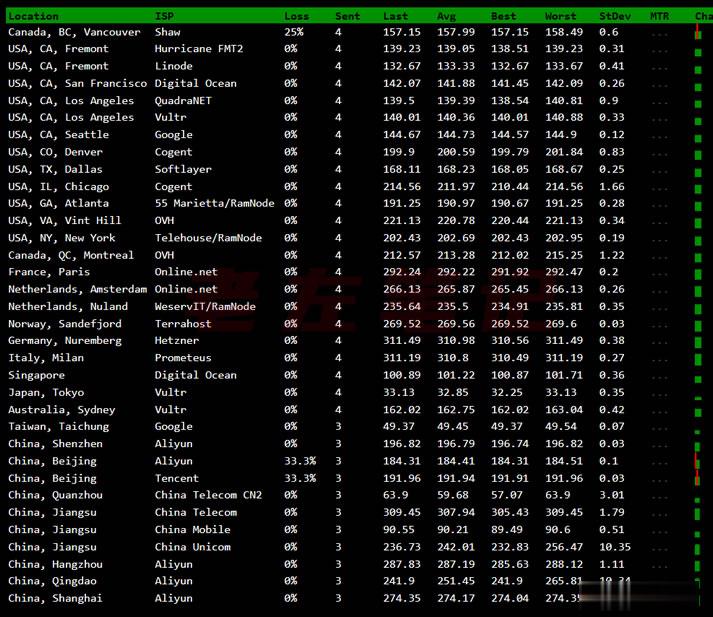
Vultr VPS韩国首尔机房速度和综合性能参数测试
Vultr 商家有新增韩国首尔机房,这个是继日本、新加坡之后的第三个亚洲机房。不过可以大概率知道肯定不是直连中国机房的,因为早期的日本机房有过直连后来取消的。今天准备体验看看VULTR VPS主机商的韩国首尔机房的云服务器的速度和性能。1、全球节点PING速度测试这里先通过PING测试工具看看全球几十个节点的PING速度。看到好像移动速度还不错。2、路由去程测试测试看看VULTR韩国首尔机房的节点...
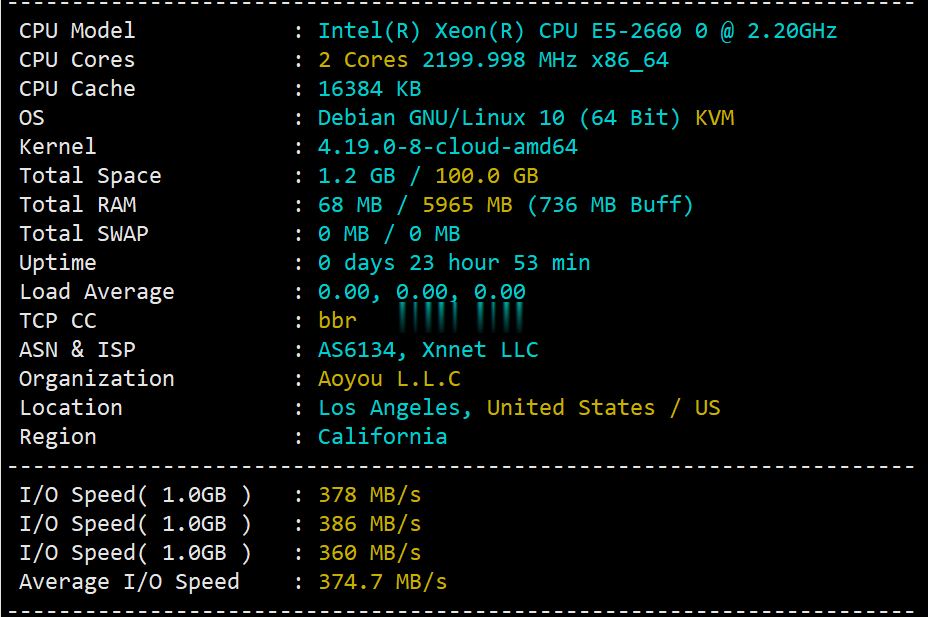
简单测评v5.net的美国cn2云服务器:电信双程cn2+联通AS9929+移动直连
v5.net一直做独立服务器这块儿的,自从推出云服务器(VPS)以来站长一直还没有关注过,在网友的提醒下弄了个6G内存、2核、100G SSD的美国云服务器来写测评,主机测评给大家趟雷,让你知道v5.net的美国云服务器效果怎么样。本次测评数据仅供参考,有兴趣的还是亲自测试吧! 官方网站:https://v5.net/cloud.html 从显示来看CPU是e5-2660(2.2GHz主频),...
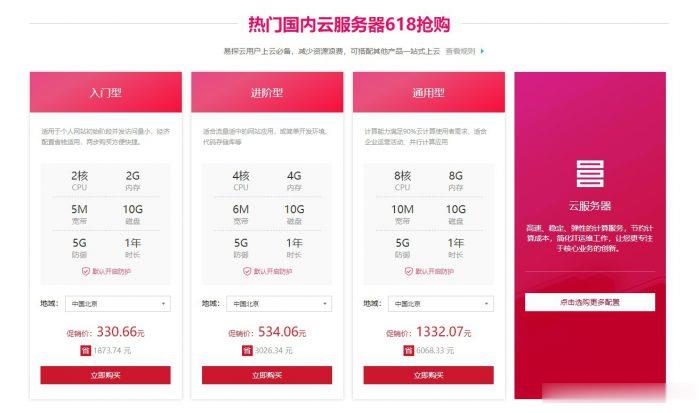
易探云2核2G5M仅330元/年起,国内挂机宝云服务器,独立ip
易探云怎么样?易探云是国内一家云计算服务商家,致力香港服务器、国内外服务器租用及托管等互联网业务,目前主要地区为运作香港BGP、香港CN2、广东、北京、深圳等地区。目前,易探云推出深圳或北京地区的适合挂机和建站的云服务器,国内挂机宝云服务器(可选深圳或北京地区),独立ip;2核2G5M挂机云服务器仅330元/年起!点击进入:易探云官方网站地址易探云国内挂机宝云服务器推荐:1、国内入门型挂机云服务器...
购物车为你推荐
-
中国企业在线中金在线和中金公司有关系吗netshwinsockresetwin7系统我在输入netsh winsock reset后错误代码11003求大神解决上不了网360免费建站搭建卡盟分站(卡乐购系统,免费360网站收录)只要29元,想建的找2208647548!北京大学cuteftpcsamy宜人贷官网宜人贷是不是骗人的dedecms自动采集织梦采集侠的功能介绍dedecms自动采集织梦CMS系统的采集功能不知道怎么采集软件。香港空间香港有哪些购物场所zencart模板zencart里那些目录分别对应MVC设计模式的模型 视图 和控制器呢?