网管网管必学技术之iis日志分析方法及工具(IIS log analysis method and tools for network management technology)
网管必学技术之iis日志分析方法及工具IIS loganalysismethodand tools for network management technology
The importance of logs has become more and more important toprogrammers, and IIS' s log is self-evident. The IIS log torecommend the use of W3C extended log file format, which is theIIS 5 is the default format, you can specify the daily recordsof customer IP address, user name, server port, method, URIresources, URI query, protocol state, user agent, to review thelog every day.
IIS' s WWW log file has a default locationof%systemroot%\system32\logf iles\w3svc1\ (for example: mineis in C:\WINDOWS\system32\LogFiles\W3SVC1\) and defaults toone log per day.
It is recommended that you do not use the default directory,change the path of a logging log, and set log access rights,allowing administrators and SYSTEM to have full controlprivileges only.
If youfindthat the IIS log is no longerrecorded, the solution:You have a look at your website: enable logging attributes -- >-- > "site" -- > "enable log" is checked.
The name format of the log file is: ex+, two digits at the endof the year + month + date.
(for example, the WWW log file for August 10, 2002 isex020810. log. )
IIS' s logfiles are text files that can be openedwithany editoror related software, such as Notepad and AWStats tools.The first four lines are the message for the log
#Software generation software
#Version version
#Date log date
The#Fields field displays the format of the record informationand can be customized by the IIS.
The main body of the log is one piece of request information.The format of the request information is defined by #Fields,and each field is separated by spaces.
Field interpretation
Data date
Time time
Cs-method request method
Cs-uri-stem request file
Cs-uri-query request parameters
Cs-username client user name
C-ip client IP
Cs-version client protocol version
CS (User-Agent) client browser
CS (Referer) reference page
The following sections illustrate part of the log file (eachlog file has the first 4 lines as follows) :
#Software: Microsoft Internet Information Services 6
#Version: 1
#Date: 2007-09-21 02:38:17
#Fields: , date, time, s-sitename, s-ip, cs-method,cs-uri-query, s-port, cs-username, c-ip, cs-uri-stem, CS(User-Agent) , sc-status, sc-substatus, sc-win32-status2007-09-21 01 : 10:51 10. 152.8. 17 - 10. 152.8.2 80
GET, /seek/images/ip.gif - 200, Mozilla/5.0+ (X11; +U; ;+Linux+2.4.2-2+i686; +en-US; +0.7)
Each of the above lines clearly recorded the remote client:Connection time 2007-09-21 01 :10:51
IP address 10. 152.8. 17 - 10. 152.8. 2
Port 80
Request action GET /seek/images/ip.gif - 200
Returns results-200 (expressed in figures, such as apage thatdoes not exist, returns at 404)
Browser type Mozilla/5.0+
System related information; X11 ; +U; +Linux+2.4. 2-2+i686;+en-US; +0.7
Attached: IIS' s FTP log
IIS' s FTP log file defaultsto%systemroot%\system32\logf iles\MSFTPSVC1\,
For the vast majority of the system (if the installation systemdefines the system directory in accordance with the actualsituation of modified) is C:\winnt\system32\logfiles\MSFTPSVC1\, and IIS WWW is the default log, a log every day.The name format of the log file is: the last two digits of ex+year+month+ date, such as the WWW log file in August 10, 2002is ex020810. log. It is also atext file that canalso be openedwith any editor, such as notepad. Compared to IIS' s WWW logs,IIS' s FTP log files are much richer. The following sectionsdescribe the contents of the log file.
#Software: Microsoft Internet Information Services 6
#Version: 1
#Date: 2002-07-24 01:32:07
#Fields: , time, CIP, csmethod, csuristem, scstatus
03:15:20 210. 12. 195.3 [1]USER administator 331
(IP address is 210. 12. 195.2, user name administator is tryingto login)
03:16:12 210. 12. 195.2 [1]PASS - 530 (logon failed)
03:19:16 210. 12. 195.2 [1]USER administrator 331
(IP address is 210. 12. 195.2, user name administrator is tryingto login)
03:19:24 210. 12. 195.2 [1]PASS - 230 (login successful)
03:19:49 210. 12. 195.2 [1]MKD brght 550 (new directory failed)
03:25:26 210. 12. 195.2 [1]QUIT - 550 (exit FTP program)Experiencedusers can use this FTP the contents of the log filethat comes from the IP address of the remote client 210. 12. 195.2
3:15 from July 24, 2002 began to try to log on to the server,has changed 2 times the username and password to succeed, andultimately to administrator account login. You should be
vigilant at this time, because the administrator account ishighly likely to leak, and for security reasons, you shouldchange your password or rename this account.
How do you identify the server?Has anyone ever taken advantageof the UNICODE vulnerability?You can see records like this inthe log:
If someone has executed intrusion behavior commands such ascopy, del, echo, .Bat and so on, there will be similar recordsbelow:
13:46:07 127.0.0. 1 GET /scripts/. . , . ./winnt/system32/cmd.Exe
401
13:46:07 127.0.0. 1 GET /scripts/. . , . ./winnt/system32/cmd.Exe
200
13:47:37 127.0.0. 1 GET /scripts/. . , . ./winnt/system32/cmd.Exe
401
Related software introduction:
If the intruder is smart enough to delete the IIS log file toerase traces, it can be seen from the event viewer that thewarning information from W3SVC often finds clues. Of course,for a particularly large Web server, manual analysis is almostimpossible-too much data! You can use third party log analysistools, such as Faststs, Analyzer, Logs2Intrusions, v. 1.0 andso on. Here' s a brief introduction to the Logs2Intrusions loganalysis tool. It is a free software developed by Turkish
Security Network, a free log analysis tool that analyzes IIS,4/5, Apache, and other log files. You can download the latestversion to http://www. trsecurity.net/logs2intrusions. Thesoftware is easy to use, and here is its main interface.After clicking the [Select] button, select the log file toanalyze, then click the [Next] button, and click the [BeginWork]button in the window that appears to begin the analysis.As shown in Figure 4, it indicates traces of invasion have beendetected. If no traces are found, the dialog box shown inFigure5 pops up.
After the traces are found, click the [Next] button to continue.[ViewReport] button is to view the report, [Save Report] buttonis to save reports, [New Report] button is to generate newreports. The following is an example of the report, .
The hyperlink is listed in the Intrusion Attempt column, whichis recommended by experts at Trsecurity. The sign.txt in thesame directory of the software is the keyword of the intrusionbehavior characteristics, and the user can supplement the newvulnerability discovery at any time.
- 网管网管必学技术之iis日志分析方法及工具(IIS log analysis method and tools for network management technology)相关文档
- 投标人网管工具
- 《信息系统项目管理师考试全程指导》
- 联网网管工具
- 多核网管工具
- 配置网管工具
- 容器网管工具
cloudcone:特价便宜VPS补货通知贴,SAS或SSD低价有磁盘阵列,SAS或SSD raid10 硬盘
cloudcone经常性有特价促销VPS放出来,每次的数量都是相当有限的,为了方便、及时帮助大家,主机测评这里就做这个cloudcone特价VPS补货专题吧,以后每次放货我会在这里更新一下日期,方便大家秒杀!官方网站:https://cloudcone.com/预交费模式,需要充值之后方可使用,系统自动扣费!信用卡、PayPal、支付宝,均可付款购买!为什么说cloudcone值得买?cloudc...

菠萝云:带宽广州移动大带宽云广州云:广州移动8折优惠,月付39元
菠萝云国人商家,今天分享一下菠萝云的广州移动机房的套餐,广州移动机房分为NAT套餐和VDS套餐,NAT就是只给端口,共享IP,VDS有自己的独立IP,可做站,商家给的带宽起步为200M,最高给到800M,目前有一个8折的优惠,另外VDS有一个下单立减100元的活动,有需要的朋友可以看看。菠萝云优惠套餐:广州移动NAT套餐,开放100个TCP+UDP固定端口,共享IP,8折优惠码:gzydnat-8...
宝塔面板批量设置站点404页面
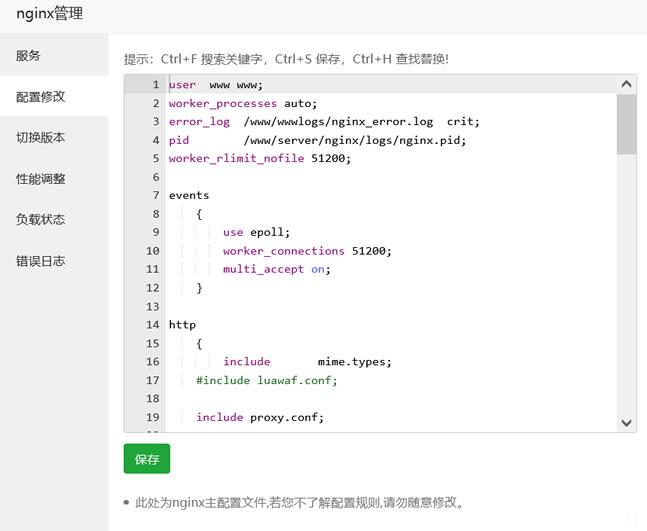
今天遇到一个网友,他在一个服务器中搭建有十几个网站,但是他之前都是采集站点数据很大,但是现在他删除数据之后希望设置可能有索引的文章给予404跳转页面。虽然他程序有默认的404页面,但是达不到他引流的目的,他希望设置统一的404页面。实际上设置还是很简单的,我们找到他是Nginx还是Apache,直接在引擎配置文件中设置即可。这里有看到他采用的是宝塔面板,直接在他的Nginx中设置。这里我们找到当前...
-
中国联通话费查询请问中国联通如何查询剩余话费?刷网站权重刷出来的流量会提高网站的权重吗?简体翻译成繁体简体中文转换成繁体怎么转换?伪静态什么是伪静态伪静态有何作用qq空间装扮QQ空间装扮硬盘人什么叫“软盘人”和“硬盘人”?神雕侠侣礼包大全神雕侠侣先手礼包在哪领怎么点亮qq空间图标如何点亮QQ空间图标创维云电视功能很喜欢创维云电视,它到底有哪些独特功能?商标注册查询官网如何在网上查询商标是否注册?