端口如何屏蔽135 139 445 3389端口 网络端口安全防护技巧(How to shield 1351394453389 port network port security protection skills)
如何屏蔽135 139 445 3389端口+网络端口安全防护技巧How to shield 1351394453389 port + network port security protection skills
Windows has many ports that are open. When you're on the Internet, network viruses and hackers can connect to your computer through these ports. In order to make your system into these ports should be closed, iron bastions, mainly include:TCP 135, 139, 445, 593, 1025, 137, 135 and UDP port 138, port 445, some of the popular virus backdoor port (such as TCP 2745,3127, 6129, port) and remote service access port 3389.Following introduction
How do I close these network ports under WinXP/2000/2003?:The first step, click the"start menu/settings/control panel /management tools, double-click to open local security policy,select the" IP security policy, on the local computer, click in the empty space right the right pane, pop-up shortcut menu,select "create IP security policy" (right) , so apop-upwizard.In the wizard, click "next" button, named the new security policy; and then click "next", shows the "safety communication request"picture, "activate the default rules" on the left side of the hook removed on the screen, click "finish" button to create a new IP security strategy.
The second step, right-click the IP security policy, in the properties dialog box, use the wizard to add "left hook to remove, and then click the Add button to add new rules, then pop up" the new rules Properties dialog box, click the Add button on the screen, playing a IP filter list window; in the
list, the first to use the add wizard left hook removed, and then click the "add" button to add a new filter.
The third step, enter the filter properties dialog box, see first is addressing the source address select any IP address,destination address "my IP address"; click"agreement" tab, in the "select the protocol type" drop-down list, select the "TCP",then "to the port" the text box enter "135", click "OK" button (left) , then add a shield TCP 135 port (RPC) filter, which can prevent the outside through the 135 port on your computer.Click "OK" to filter list dialog box, you can see has added a strategy, repeat the above steps to add TCP 137, 139, 445, 593,139, 135 UDP port and 445 port, the establishment of the corresponding filters for them.
Repeat these steps to add TCP, 1025, 2745, 3127, 6129, and 3389port shielding strategies, establish a filter for the above port, and click the OK button at last.
The fourth step, in the "new rules properties" dialog box,select the "newIPfilterlist", thenclickthe left circle with a point that has been activated, and finally click the filter action tab. In the filter tab, use the wizard to add "left hook removed, click the Add button, add a" stop"operation (right) :"filter actionattribute "" security"tab, select" stop"button,then click" OK ".
The fifth step, into the "new rules of the properties dialog box, click the"newfilter operation", to the left of the circle with a point that has been activated, click" close "button to
close the dialog box; finally returned to the new IP security policy properties dialog box, tick the" new IP filter list "on the left, clickOKto close thedialogbox. Inthe local security policy window, with the right mouse wants to hold more green?IP security strategy, and then select "assigned".
Thus, after restarting, the network port in the computer is closed, and the virus and the hacker can not connect to these ports anymore, thus protecting your computer.
Router settings:
1, close 7.9 and so on port: close SimpleTCP/IPService, support the following TCP/IP services: CharacterGenerator, Daytime,Discard, Echo, and QuoteoftheDay.
2, turn off 80: turn off the WWW service. In service, display the name "WorldWideWebPublishingService" and provide the Web connection and management through the management unit of the Internet information service.
3, turn off the 25 port: turn off the
SimpleMailTransportProtocol (SMTP) service, it provides the function is to send e-mail across the network.
4, turn off the 21 port: turn off FTPPublishingService, which provides services through the Internet information service management unit to provide FTP connection and management.5, turn off the 23 port: turn off the Telnet service, which allows remote users to log on to the systemand run the console
program using the command line.
6, there is also avery important thing is to turn off the server service,
This service provides RPC support, documentation, printing,and named pipe sharing. Turn off it and turn off the default share of Win2K, such as ipc$, c$, admin$, and so on. This service is closed and does not affect your common operation.
7, and there is a 139 port, 139 port is NetBIOSSession port,used to file and print sharing, note that the samba machine running UNIX also opened 139 ports, the same function. Before streamer 2000 used to determine the other host type is not accurate, it is estimated that 139 ports open, both considered NT, and now good.
Listen to the closed 139 method is in the network and dial up connections "in the" local connection "selected" Internet protocol (TCP/IP) into the "TCP/IP" attribute, advanced settings ""WINS settings "is a" disable TCP/IP NETBIOS ", tick off Port 139.
For individual users, you can set it as "disable" in each service property setting so that the next restart service will be restarted and the port will be open.
We generally use some powerful anti - Black software and firewalls to ensure our system security, but some users do not have the above conditions. What shall I do?Here' s a simple way to help prevent illegal intrusions by restricting ports.
The mode of illegal invasion
In brief, the way of illegal invasion can be roughly divided into 4 kinds:
1, scan port, through the known system Bug into the host.2, grow Trojan, use Trojan to open the back door, enter host.3, the use of data overflow means, forcing the host to provide back door access to the host.
4, use some software design vulnerabilities, directly or indirectly control the host.
The main way of illegal intrusion is two, especially the use of some popular hacking tools, the host through the first way to attack the most, is the most common; and the last two ways,only some superb means of hacking to use, does not spreadwidely,and as long as these two kinds of problems software, service providers will soon provide patches, timely repair system.Therefore, if we can restrict the first two kinds of illegal intrusions, we can effectively prevent the illegal invasion of hacker tools. Moreover, the first two illegal intrusions have one thing in common, that is, access to the host through the port.
Ports are like a few doors of a house (server) , and different doors lead to different rooms (different services provided by
the server) . Our common FTP default port is 21, while the WWW web page generally defaults to port 80. But some sloppy network administrators often opened some easy invasion of port services,such as 139; there are some Trojans, such as ice, BO, etc. , are not aware of you open a port automatically. So, as long as we do not use their own ports all blocked up, does not put an end to these two illegal invasion?
Method for restricting ports
For individual users, you can limit all ports, because you don't have to make your machine to provide any service to the outside;and to provide network services to foreign servers, we need to have to use ports (such as the WWW port 80, FTP port 21, mail service ports 25, 110) , other the port is closed.
Here, for users using Windows2000 or WindowsXP, there is no need to install any other software, and you can use the TCP/IP filter feature to restrict the server' s ports. Specific settings are as follows:
1, right-click on the "network neighborhood", select
"properties", and then double-click"local connection" (if the dial-up Internet users, select my connection icon) , pop-up the "local connection status" dialog box.
2, click the [properties] button, pop-up the local connection properties, select this connection, use the following items in the Internet protocol (TCP/IP) , and then click the [properties]button.
3, click the [advanced] button in the pop-up Internet protocol (TCP/IP) dialog box. In the pop-up"advanced TCP/IP settings",select the Options tab, select TCP/IP filter, and then click the properties button.
4, in the pop-up TCP/IP Filter dialog box, select the TCP/IP enabled filter check box, and then leave the "TCP port" on the "only allowed" election (see figure) .
In this way, you can come to add or delete your TCP or UDP or IP ports.
After you add or delete, restart your machine, your server is protected.
If you only browse the Internet, you can not add any port. But touse somenetworkcontact tools, such as OICQ, it is necessary to open the port "4000",
Similarly, BitComet ports: TCP:8927, UDP:8927
If you find a common network tool that doesn't work, make sure it' s on the port where your host is running, and then add ports in the TCP/IP filter.
Detailed settings see Figure: inaccordancewith the red circle in turn opened, until the fourth chart, in accordance with the red circle position is set, and finally determine the way.
Reboot the system.
It' s also easy to change it. Change the last picture to the default setting and restart the OK
Network port security protection skills (append one)
Communications between computers through ports, for example when you visit awebsite, Windows will open aport on the machine (for example, port 1025) a port to connect to the web server and the distance, so when you visit someone else. By default,Windows will open many service ports on your computer, and hackers often use these ports to implement intrusions.Therefore, mastering port knowledge is an essential skill for secure Internet access.
Common ports and their classification
The computer needs to use TCP/IP protocol to communicate with each other on the Internet. According to the TCP/IP protocol,the computer has 256 * 256 (65536) ports. These ports can be divided into two kinds: TCP port and UDP port. If the port number is divided, they can be divided into the following two categories:
1. system reserved port (from 0 to 1023)
The port does not allow you to use, they all have the exact definition, corresponding to some common services on the Internet, each open the port, represents a system service, such as port 80 on behalf of the Web service. 21 corresponds to FTP,
25 corresponds to SMTP, 110 corresponds to POP3, and so forth (Figure 1) .
2. dynamic ports (from 1024 to 65535)
When you need to communicate with others, Windows will assign a dynamic port from the 1024, and if the 1024port is not closed,1025 ports will beallocated for youtouse whenyouneed aport,and so on.
However, there are individual system services that bind to ports 1024 to 49151, such as 3389 ports (remote terminal services) . From49152 to 65535, this port is usually not bundled with system services, allowing Windows to be dynamically allocated to you.
Two, how to see which ports are open?
In default, Windows opens many "service ports". If you want to see which ports are open and which computers are connecting to the machine, you can use the following two methods.
1. using the netstat command
Windows provides the netstat command to display the current TCP/IP network connection. Note that only the TCP/IP protocol is installed before you can use the netstat command.
How to do it: click "start, program, annex, command prompt",enter the DOS window, enter the command netstat, -na enter, so it will show the connection and the open port, as shown in figure
- 端口如何屏蔽135 139 445 3389端口 网络端口安全防护技巧(How to shield 1351394453389 port network port security protection skills)相关文档
- 穿透3389端口
- 端口怎样关闭windows2000的3389端口
- 修改如何更改Win7的远程桌面端口3389
- 连接如何修改3389端口号
- 连接如何修改3389端口号
- 连接应该如何修改3389端口号
DogYun春节优惠:动态云7折,经典云8折,独立服务器月省100元,充100送10元
传统农历新年将至,国人主机商DogYun(狗云)发来了虎年春节优惠活动,1月31日-2月6日活动期间使用优惠码新开动态云7折,经典云8折,新开独立服务器可立减100元/月;使用优惠码新开香港独立服务器优惠100元,并次月免费;活动期间单笔充值每满100元赠送10元,还可以参与幸运大转盘每日抽取5折码,流量,余额等奖品;商家限量推出一款年付特价套餐,共100台,每个用户限1台,香港VPS年付199元...

香港E3-1230v2 16GB 30M 326元/月 数脉科技
官方网站:https://www.shuhost.com/公司名:LucidaCloud Limited尊敬的新老客户:艰难的2021年即将结束,年终辞旧迎新之际,我们准备了持续优惠、及首月优惠,为中小企业及个人客户降低IT业务成本。我们将持续努力提供给客户更好的品质与服务,在新的一年期待与您有美好的合作。# 下列价钱首月八折优惠码: 20211280OFF (每客户限用1次) * 自助购买可复制...

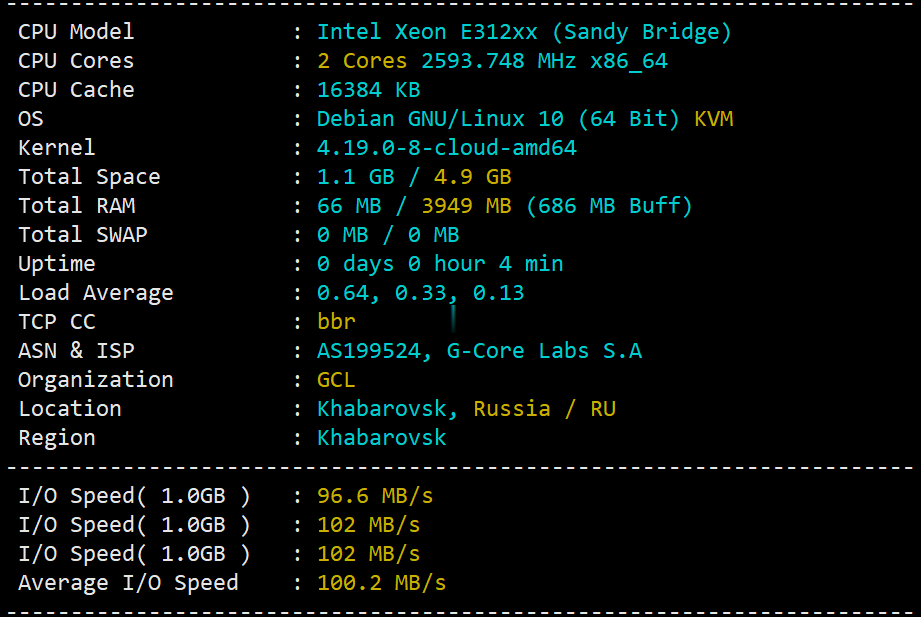
gcorelabs远东khabarovsk伯力Cloud云服务器测评,告诉你gcorelabs云服务器怎么样
说明一下:gcorelabs的俄罗斯远东机房“伯力”既有“Virtual servers”也有“CLOUD SERVICES”,前者是VPS,后者是云服务器,不是一回事;由于平日大家习惯把VPS和云服务器当做一回事儿,所以这里要特别说明一下。本次测评的是gcorelabs的cloud,也就是云服务器。 官方网站:https://gcorelabs.com 支持:数字加密货币、信用卡、PayPal...
-
域名价格域名怎么评估价钱?美国主机租用美国服务器租用整的这么便宜 啊国外空间租用好用的国外空间国内ip代理谁有最快的国内IP代理HTTPjsp虚拟空间自己组建jsp虚拟主机运营,技术方面有哪些要求?香港虚拟主机推荐一下香港的虚拟主机公司!100m虚拟主机100M的虚拟主机都能做些什么山东虚拟主机400电话哪家代理商办理得比较好天津虚拟主机天津有代理店掌柜的公司吗?在哪?深圳虚拟主机深圳市虚拟主机深圳双线虚拟主机深圳主机合租深圳合租主机空推荐有哪?